
MINI MEETINGS
Like last year, Mini Meetings will last 15 minutes with a 5 minute break after each one.
Step 1: Download the Mobile App
The first step is to download the Eventify app to your phone or tablet.
Video Instructions
Step 2: Schedule Your Meetings
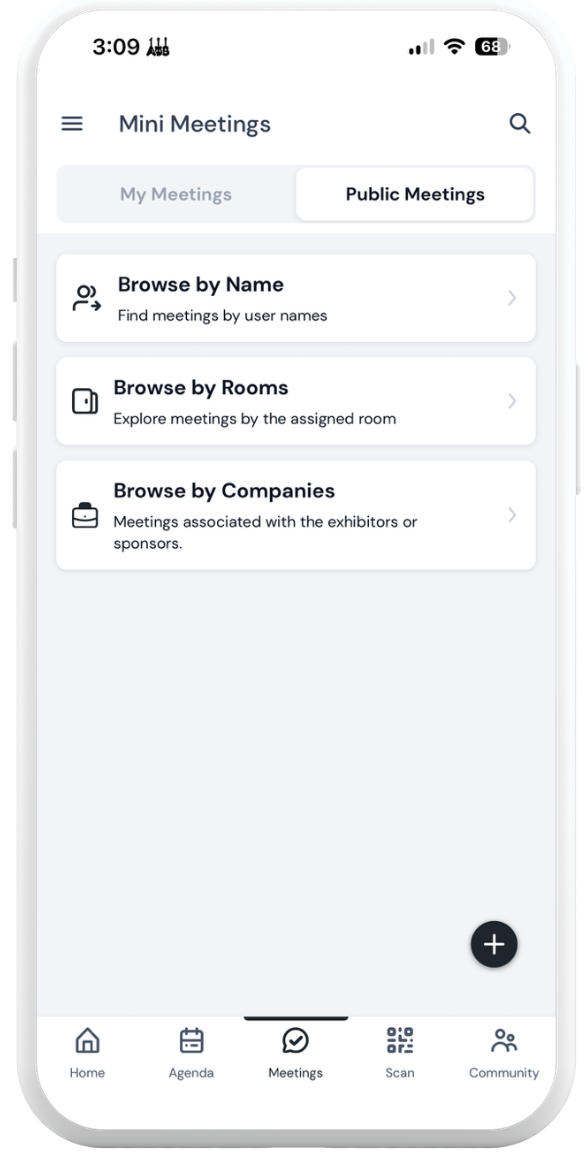
Tap on the Meetings button in the main menu or on the bottom tray of the Eventify app
Tap on Public Meetings
Tap to Browse by Name or Browse by Companies
Tap on Name or Company
Tap on the Mini Meeting date in the calendar view: September 15
Tap on time slot
Note: meeting times will only show in the event’s local time zone.
Tap through to schedule your meeting
Meetings will now show on the homepage of your app and in the Meetings section
Concerned about consolidating your meetings to their location? Tap on Browse by Rooms
Review the meeting rooms map Conference Center and Salt River/Ballroom.
Tap on the Room Name
Tap on the Meeting Host
Tap on the Mini Meeting date in the calendar view: September 15.
Tap on time slot.
Note: meeting times will only show in the event’s local time zone.
Tap through to schedule your meeting
Step 3: Meeting Confirmation
Scheduled meetings will show on the homepage of and in the Meetings section of your app.
You will receive an email confirmation with meeting information after each meeting is scheduled.
Mini Meetings Day
On the day of Mini Meetings, navigate to the “Meetings” in the main menu or on the bottom tray of the Eventify app to view your meetings.